Note: You are viewing this page on a small screen device (<640px width). Some of the illustrations and animations in the article may become unreadable after matching them to the screen resolution.
Yestok.pl
Jerzy Moruś
© All rights reserved. The use of the entire website or parts thereof without written permission is prohibited.
Universal Gregorian Calendar
Development is based on the existing version of the program during its writing, LibreOffice: 5.2.6.


The template is a complete project, so that you can print the calendar for the selected year. The project does not contain macros. Due to the use of IFERROR function it can not be used in an Apache OpenOffice. Apache OpenOffice Calc does not support this feature, and indicates an error (as at version 4.1.3).
Version 1.1 of 02/07/2018The previous version of the calendar after saving the file and reopening it, "lost" information about the categories assigned to the date, even though the category names were in their places. I improved this selection algorithm. Currently, after saving the file, the categories assigned to the date are not "forgotten". Existing users can copy their input to the new version of the spreadsheet.In the "Flexible" worksheet, I changed the selection list for the name of the weekday. Currently, the list contains the names of the day of the week in the user language of the LibreOffice package preceded by the ordinal number. Existing users after copying data to this sheet must re-select the name of the day of the week.Correspondence: clndr(at)yestok.plLink to download the calendar version directly from my website: calendar.ots
The user can specify any days that are highlighted on the calendar. Calendar cards contain the names of months and names of the weekdays in the user’s language (the default user’s language of LibreOffice package). The project consists of several sheets. Sheet “Home” allows you to set the basic parameters:
- interface language,
- One’s own category name, and selection whether they will be used,
- the presentation of the names of months and days of the week on the pages of the calendar,
- the type of calendar used to determine the date of Easter and
- the year for which the calendar is to be prepared.
Sheets with names from “I” to “XII” contain cards of individual months of the year. The names of days of the week and the names of months appear in a language which is the default language of the LibreOffice suite (Locale setting).
Sheets “Easter”, “Flexible” and “Fixed” are intended to identify these days in the calendar, which will be highlighted in it.
Three additional sheets are hidden because they are worksheets. All sheets are enabled security and allow you to enter data only to the appropriate locations.
The calendar can be prepared for the years since 1583.
The work has been finished by using the version of LibreOffice 5.2.6.
Selection of the interface language.
The calendar can be operated in one of four languages. Polish (the author’s country), English, German and Russian. The selected language determines the content of the presentation of information. Names of months and days of the week on the pages of the calendar are in a language which is assigned by default to the LibreOffice suite.
Card of the calendar.
Layout of days in the calendar on the month card is shown in Fig. 2.
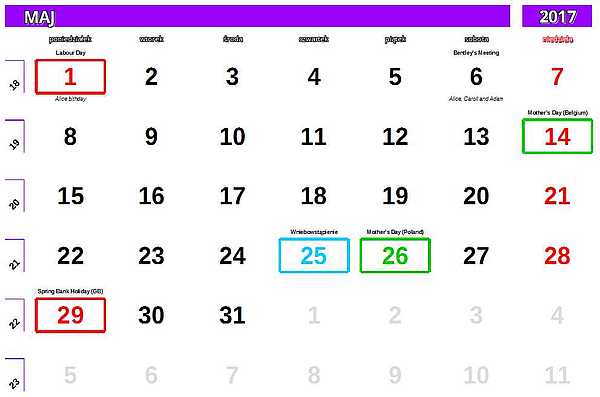
The illustration shows the card in the Polish language. Each month is represented as an array presenting six consecutive weeks. According to ISO 8601:2004 the first day of the week is Monday. Each week is preceded by its serial number. The order number is assigned within the calendar year in which at least 4 days of this week are contained. This means that some initial days of the year may belong to the last week of the previous year and some last days of year to the first week of the following year.
Each day of the month can be represented as a normal day or the day highlighted. Ordinary days only contain the ordinal number of the day, for weekdays black and red for Sundays. If the serial number of the day should not be presented to the month on the calendar card, it is shown in gray.
Highlighting days.
Distinction of the day consists in determining the date and assigning it to one of the five categories. Days highlighted may contain additional descriptions placed above and below the ordinal number of the day. This description can not be longer than 30 characters.
Types of highlighted days.
-
The first type is a fixed day, that is, it always has the same date of the year. These include, for example, New Year's Day (1.I.), Christmas (25.XII. and 26.XII.) and other days of country-specific (holidays), people (birthdays, wedding anniversary) or customs (Valentine's Day, Mother's Day).
This type of day is defined in the sheet “Fixed”. Days can be defined in any order giving the number of the month, the day of the month, category, and descriptions (if they occur).
First entered as permanent and indelible date is February 29. This date appears in the calendar every four years and if you assign it to a category and descriptions, it is activated only in a leap year. If such a date is needed, use this entry. This date can not be put back on the list, the possibility of its introduction is blocked.
The sheet allows distinction every day of the year.
-
The second type is dependent on the date of Easter.
In all Christian denominations special meaning is assigned to Easter holidays. It is a movable feast and its date will be the first Sunday after the first full moon of spring. This date is given in relation to the now widely used Gregorian calendar (Pope Gregory XIII introduced a major reform of the calendar in the sixteenth century), but many churches still define the date of Easter according to the Julian calendar (Julian calendar was developed in the 45th BC on the demand of Julius Caesar and was obligatory until 1582). Therefore, the user must choose the type of calendar used to determine these dates. The dates of the most movable Christian holidays including Easter Triduum, Pentecost, Ascension, Corpus Christi will depend on Easter, as well as other days such as Ash Wednesday, Mardi Gras, the last Saturday of the carnival, or Shrovetide.
Defining these days takes place in the sheet “Easter”. Placed first in this set, calculated for a given year is the date of Easter Sunday. This date can not be removed, and if it is deprived of its category other dates dependent on Easter will not be highlighted.
To determine these dates you should enter in the “shift” a number indicating how many days after (positive number) or how many days before (negative) Easter, a particular day is highlighted. This type of date can only be added to one description - “Description of the top”.
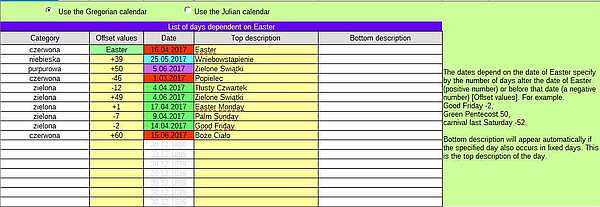
Fig. 3: Examples days dependent on Easter. Setting a shift, attention should be paid to the definitions of days. For example, “Ascension” celebrated on the fortieth day of the Lord's resurrection (Thursday) is essentially 39th day after Easter Sunday, and in some countries according to the the decision of the local episcopates it is transferred to the seventh Sunday after Easter, i.e. 42 days later.
You can specify up to sixteen days of such subsidiaries.
Below there is a summary of some selected days associated with the date of Easter along with their shift.
- Fat Thursday (-52),
- the last Saturday of the carnival (-50),
- Shrovetide (-47),
- Ash Wednesday (-46),
- Palm Sunday (-7),
- Holy Thursday (-3),
- Good Friday (-2),
- Holy Saturday (-1),
- Easter Monday (+1),
- the Feast of the Divine Mercy (+7),
- Ascension (+42),
- Pentecost (Whit Sunday) (+49),
- Pentecost (Whit Monday) (+50),
- Corpus Christi (+60).
-
The third type - these are dates dependent on the day of the week. They are related to events occurring on a specific day of the week of a given month. In some countries, these dates are called "Bank Holiday". For example, the last Monday of May in the UK is called “Spring Bank Holiday”, the first Friday of August in Scotland and Ireland is called “Summer Bank Holiday” or the second Sunday of May, when in Belgium it is Mother's Day (but is not celebrated).
These dates are defined in the sheet “Flexible”. You need to define the category, the number of the month, the name of the day of the week and specify which day of the month is considered. The example of such an arrangement is shown in Fig. 4.

Fig. 4: Sample list of days dependent on the day of the week. Day of the week are selected from the drop-down list of names of weekdays. Names of days of the week appear in the default user’s language of the package. The choice, which day it is to be in the month (the first, second, third, fourth, fifth or last) should be indicated as a selected symbol on the drop-down list, “Which day?”. The form of this list is shown on the illustration below.
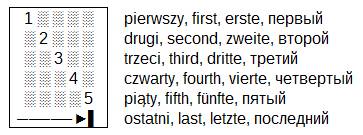
Fig. 5: combo “Which day?”. This type of date also allows you to add only “Description of the top”. Such dates can be specified up to 25.
Categories.
Category decides how to present the date in the calendar. Categories are given their own symbolic names just to allow you to refer to them. The use of the category depends entirely on the user. I have defined five categories.
- Red - The serial number of the day will be presented in red and surrounded by the same frame. Typically in this way calendars show the holidays - church and state - which are days off from work. An example of such a day is presented in Fig. 2. 1.V. and 29.V.
- Purple - serial number of the day will be presented in purple and surrounded by the same frame.
- Blue - serial number of the day will be shown in blue and surrounded by the same frame. An example is the day 25.V. (Ascension Day marked as the fortieth day after the Resurrection of the Lord.)
- Green - serial number of the day will be presented in green and surrounded by the same frame. An example of the illustration are days 14.V. (Mother's Day in Belgium) and 26.V. (Mother's Day in Poland).
- Black - In this category the number of the day is presented as ordinary date, but placed with descriptions (if any). An example is the date 6.V. comprising two descriptions.
Serial number of a day falling on Sunday is always red, regardless of the assigned category.
You can define your own category names by typing them into the appropriate fields in the worksheet “Home”. To use this names you should additionally enable the “My category name”.
Categories are selected by developing a list of choices. The list appears in the language of interface or, if the option “My category name” is set, the names provided by the user are displayed. If the option is enabled, but names of categories are not defined, the names used in accordance to the interface are displayed. The category is removed by pressing keyboard “DELETE” button. Date that is not assigned to any category is treated as a date without distinction.
Descriptions.
Descriptions can be added to each day, but they will appear on the calendar only when the date will be assigned to category. Dates highlighted in the worksheet “Fixed” can have two descriptions. One will be added above the ordinal number of the day and will be given in bold and the second, below the ordinal number of the day, shown in italics. The content of every description can have a maximum of 30 characters. The length of the description is controlled.
Dates highlighted in sheets “Easter” and “Flexible” can have only one description- a top description. If the date occurring in these sheets also has a counterpart in the worksheet “Fixed” then an upper description of the date “Fixed” will be automatically transferred to the lower description of the date in the “Easter” and “Flexible”. If the "Fixed" date does not have a top description, then the bottom description will be moved.
Determination of highlighted days.
All highlighted days form the set of dates selected according to groups: first, dates dependent on Easter, next dates dependent on the day of the week, and finally fixed days. Each date in the calendar is searched in this set, and if it is found it receives an appropriate category and descriptions. The category found at the earliest is accepted. Theoretically, the same date may occur repeatedly in the statement. E.g. Fat Thursday may be specified in the list of days depending on the Easter and fall just on a certain Thursday of the month and also the date of that Thursday may coincide with the date stamped on solids. In such a situation, a category from the list of days dependent on Easter (date occurs earlier) will be accepted.
To the dates in sheets “Easter” and “Flexible” can not be attributed to the category of “Black”. If the Easter Sunday (“Easter” sheet) does not have a category, then no dates will be highlighted.
Printing.
To print selected months you should note these sheets and print them. Selecting a few sheets selected - CTRL+click on any chosen selection sheets, “from - to” “click” on the first and then “SHIFT+click” on the final selection. On the status bar there is the name of the page style “Calendar”, double click on the name will open a dialog box where you can specify a different format of printed pages. Normally, this is A4 format page in landscape orientation.
Changing the language of the calendar.
Calendar can be printed in any language available in the LibreOffice software. You will need to change the default language package to another. After such a change, you have to re-enter the year. Changing the default language and the change of interface does not affect the established days highlighted. The sheet “Home” can be determined by way of presenting the names of days and the names of months on the pages of the monthly calendar. From the drop-down list, select the desired way.
If you liked the project, you can support the author via PayPal.
The support will be fulfilled via the online payment service PayPal. You do not need to have an account on this site. Just click next drawing. When you have your PayPal account, you can use the link PayPal.me . PayPal.me link.
Thank you!
| Operating System Windows / Linux | MacOS operating system | |
| Clicking the right mouse button | Control + click | |
| CTRL key (in the keyboard shortcuts) | key ⌘ | |
| F5 | Navigator | Shift + ⌘ + F5 |
| F11 | Styles and Formatting | ⌘ + T |